

Unlimited Post Buttons – WordPress Plugin Description
Unlimited Post Buttons is a lightweight yet powerful WordPress plugin that lets you add unlimited custom buttons to any post with ease. After installing the plugin, two additional fields are automatically added to the post editor for each button: one for the Button Text and another for the Button URL. If you need more buttons, simply click the Add Button option to create as many button fields as you want.
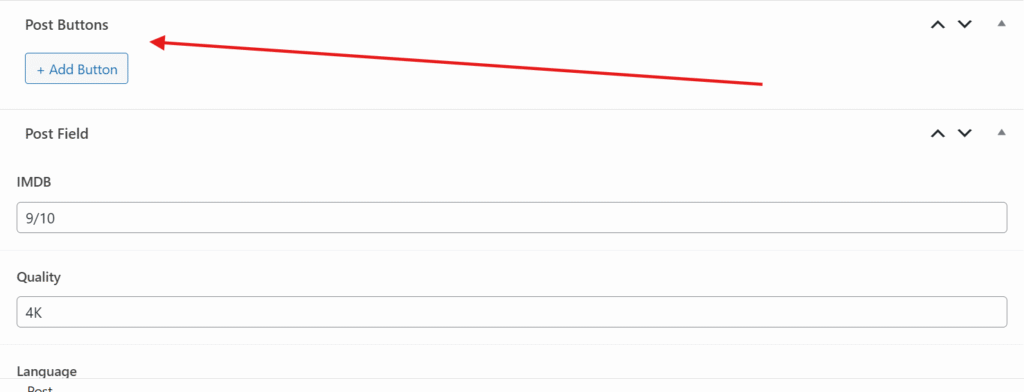
The plugin uses a shortcode-based system, giving you complete control over where the buttons appear on the frontend. Buttons will only be displayed if you place the following shortcode inside your post or page:
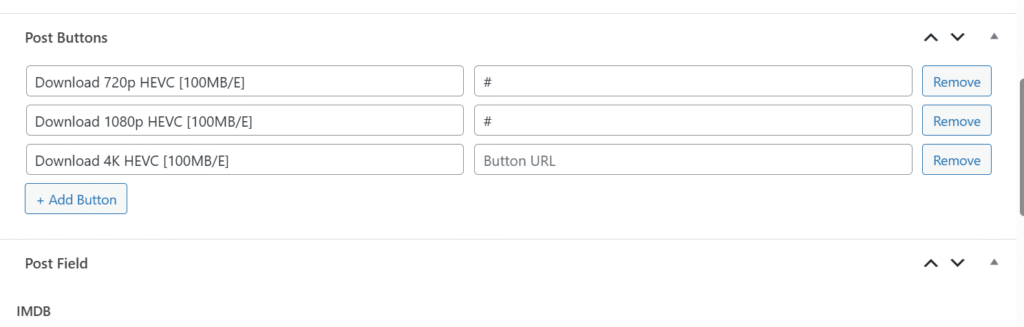
[post_buttons]This makes it perfect for placing download buttons, demo links, affiliate links, external resources, product pages, documentation links, and much more.
Features
- ✅ Add unlimited buttons to any post.
- ✅ Simple Button Text and Button URL fields.
- ✅ One-click option to add more button fields.
- ✅ Shortcode-based output for complete placement control.
- ✅ Clean and lightweight with minimal performance impact.
- ✅ Works with any WordPress theme.
- ✅ No coding required.
- ✅ Easy to use for beginners and professionals.
How It Works
- Install and activate the plugin.
- Edit any post.
- Enter the Button Name and Button URL.
- Click Add Button to create additional buttons if needed.
Insert the shortcode below where you want the buttons to appear:
[post_buttons]- Publish or update the post.
The plugin will automatically display all the buttons you added for that post at the shortcode location.
Perfect For
- Download buttons
- Demo buttons
- Buy Now buttons
- Affiliate links
- Documentation links
- Source code links
- External resources
- Course materials
- Product pages
- Any custom call-to-action buttons
Unlimited Post Buttons gives you a simple, flexible, and shortcode-powered way to manage multiple action buttons in your WordPress posts without cluttering your content. Simply add your buttons in the editor, place the shortcode where you want them, and you’re done.